
Crosshair Angle Tools Panel
Crosshair Angle Tools Panel
This panel supplements the dview twist panel in that it manipulates the crosshair angle independently of the dview twist angle.
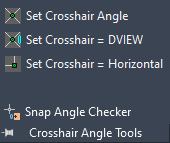
Set Crosshair Angle – This command changes the angle of the crosshairs in the current drawing based on user input.
Set Crosshair = DVIEW – This command changes the crosshair angle to the same value as the current DVIEW twist angle.
Set Crosshair = Horizontal – This command changes the crosshairs to be horizontal in the current view.
Snap Angle Checker – This lists the current value for the crosshairs.